
Home › Product
The product
What it does, and what it does not
OptionStudioEvo is a Windows program for options. One price, one program, every feature switched on. This page is the whole list — including what is not in the brochure: that part is what makes the rest trustworthy.
What it does
Nine things, all running on your own machine.
The payoff, and what time does to it
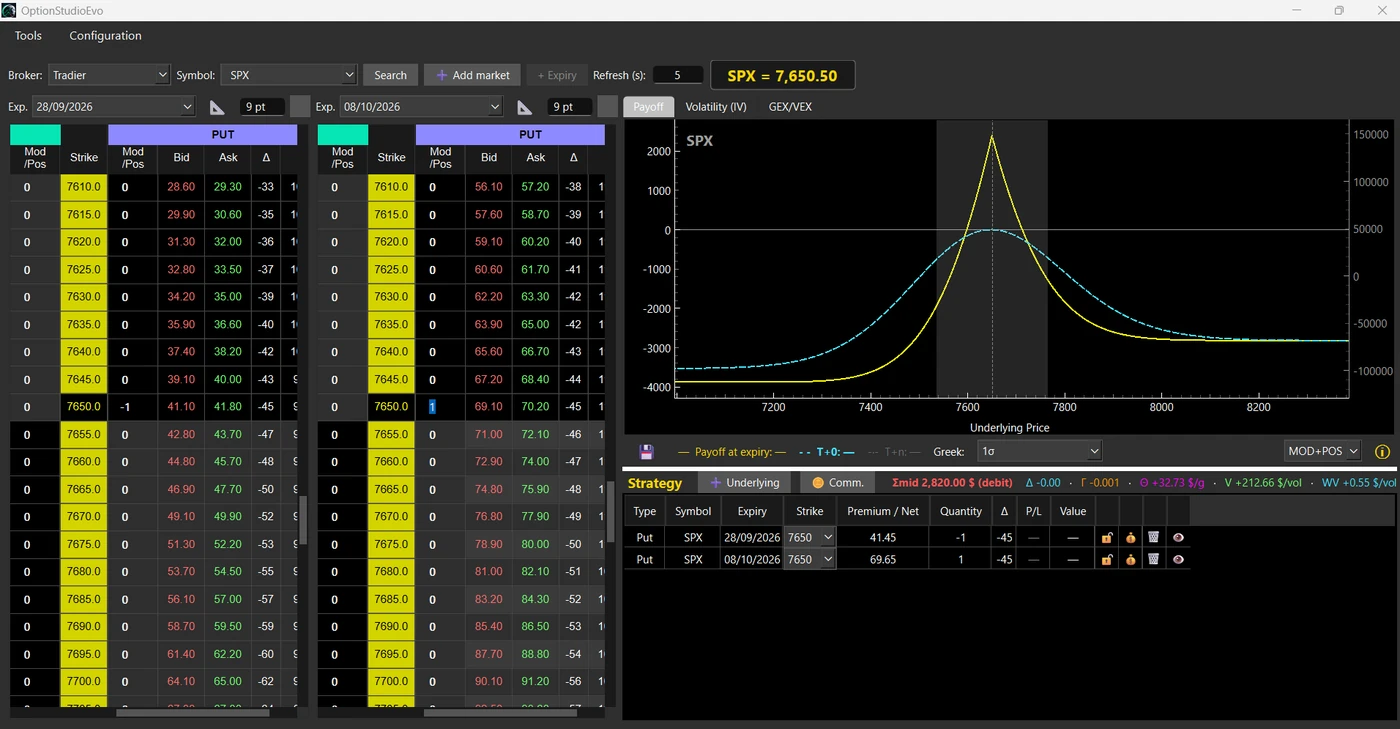
Three curves on one chart: the position at expiry, today (T+0) and a day between today and expiry (T+n), with steps that can be fractions of a day. The same trade, read at the times that matter.
Several expiries, one position
The put you sold this month and the one you bought next month are one position, drawn as one shape. That is where calendars, diagonals and rolls stop being arithmetic and become a shape you can look at.
What if…
Move the underlying, the volatility or the days: the curves redraw and the position is revalued. You ask the question on screen, instead of paying the market to find out.
The Greeks, in dollars
Delta, gamma, theta and vega computed on your machine and quoted in dollars per day and per volatility point, recomputed as quotes move. A half-dollar move can then be weighed against the commission it costs.
Twenty ready-made strategies
Verticals, straddles, strangles, synthetics, butterflies and condors, Jade Lizard — with direction, width in strike steps, and anchoring to the nearest strike.
Packages, and stocks beside the options
Multi-leg packages with their net price, built and closed together. And the underlying beside the options, with its cost basis, so a covered call, a protective put or a collar is built by adding it.
Gamma walls and Gamma Flip.
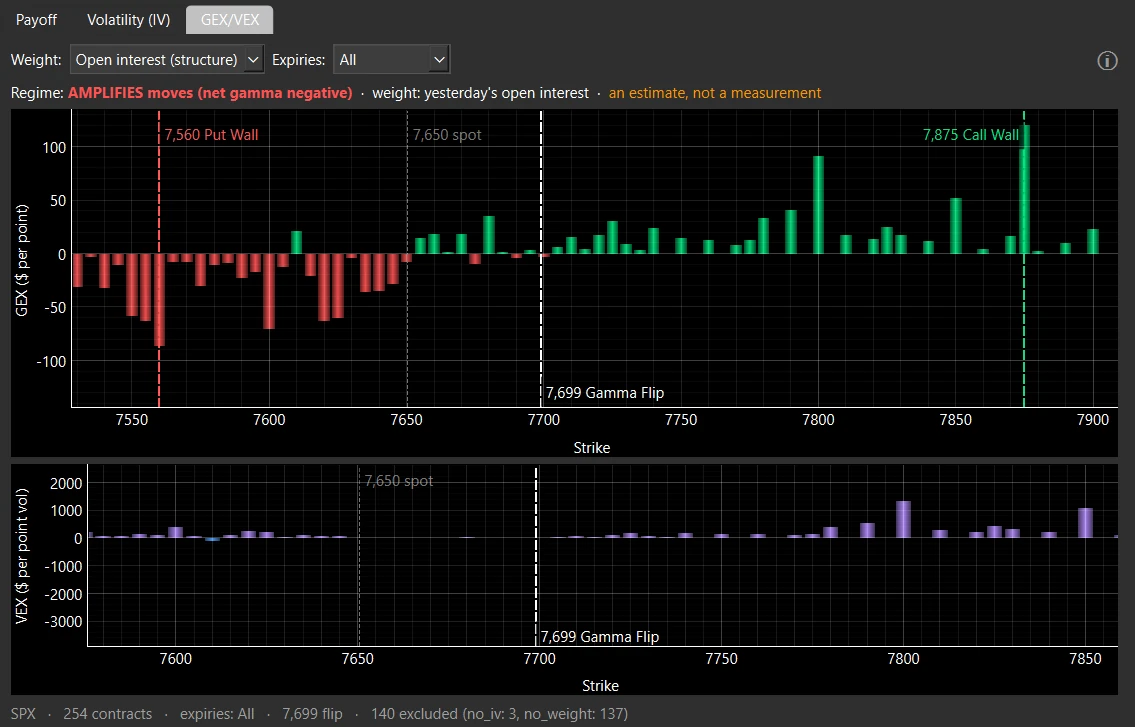
Where the dealers are long and where they are short, and the strike where hedging reverses. It is an estimate from open interest, not a measurement, and the screen says so.
What a trade actually costs you
The per-contract and per-share commissions, which may vary between opening and closing trades, as charged by your broker. If you’ve switched brokers to save money, this is the figure you need to check before placing any order—don’t wait until you see it on your statement afterward.
Saved, compared, combined
Build a strategy, save it, call it back, compare it with another, combine them. The program remembers your work, and it does so on your disk.
On the same engine: the interface and the charts follow the language you choose, and the market data comes from your own broker account. The program works without a connection to us: there is nothing of ours to connect to.
Screenshots
Six figures, and the three still to be taken.
Three of the six are here, taken from the program with the figures in dollars, so what you read and what you see agree. The other three are marked below with the exact screen each one is waiting for. This page says so instead of putting an older picture in their place.

What it does not do
The list that makes the other one trustworthy.
No order is placed on its own.
No signals, no advice
It does not tell you what to trade, does not rate a strategy, does not promise a result and does not say when to enter or leave. It is a tool for reading a position: the decision is yours.
No automatic trading
There is no algorithm running in the background. The program sends an order to your broker when you ask it to, and at no other time. You decide, you click.
No backtesting
It does not test a strategy against years of past prices. That is a different job, done by other tools; this one looks at the position you have and at what could happen to it.
No server of ours, and no account with us
There is no cloud account to create, no login, no telemetry, no usage statistics and no error reporting. Your key, your positions and your saved strategies stay on your machine.
It does not move your money
It cannot open, fund, transfer or close a broker account. Those belong to you and your broker.
It does not replace your broker
Prices, fills, fees and permissions are the broker's. The program shows what the broker returns and computes from it: it is not a market data source of its own.
An estimate is called an estimate
Gamma walls and reversal levels come from open interest: a reading of the market's positioning, not a measurement of it, and the screen says so where the numbers are. Where a figure is a calculation, we say so; where it is a reading, we say that too.